

Need More Leads From Google?
Get Professional SEO, Local SEO, Website Development and AI Automation Services.
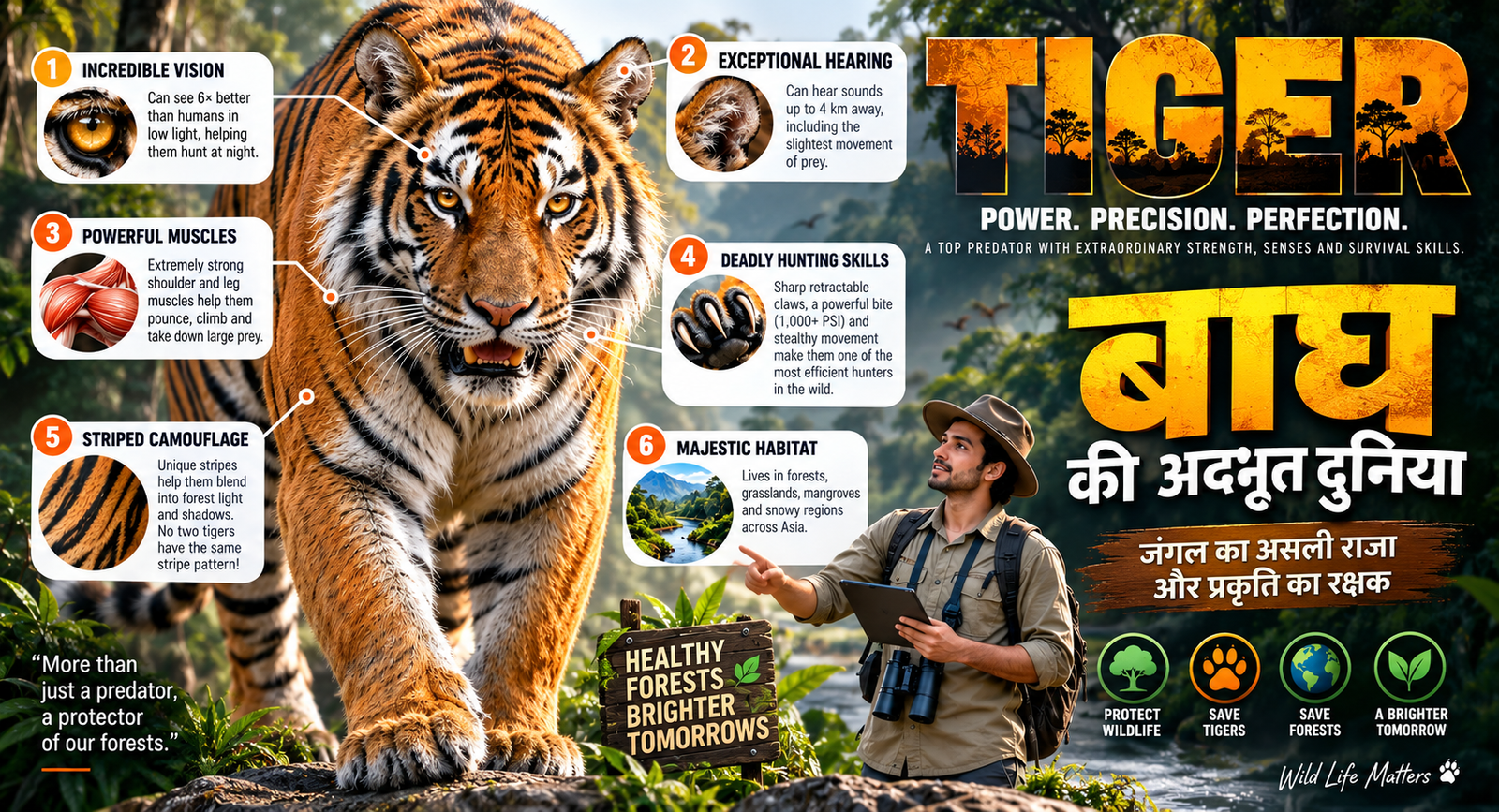
Book Free Consultationक्या आप जानते हैं कि बाघ की आँखें, सुनने की क्षमता, शक्तिशाली मांसपेशियाँ और अनोखी धारियाँ उसे जंगल का एक बेहतरीन शिकारी बनाती हैं?
इस शानदार educational infographic में जानिए Tiger की vision, hearing, hunting skills, powerful muscles, camouflage, habitat और ecosystem में उसकी महत्वपूर्ण भूमिका के बारे में।
बाघ सिर्फ एक शिकारी नहीं, बल्कि जंगल के प्राकृतिक संतुलन का एक महत्वपूर्ण हिस्सा है। इसे बचाना यानी हमारे जंगलों और biodiversity के भविष्य को बचाना।
Image Prompt
Create a vertical 9:16 premium educational infographic poster about [Tiger], designed like a high-end modern science explainer for Instagram Reels, combining a large realistic 3D animal/creature render with clean infographic design. Use a clean white, light gray, or soft neutral background with bright studio lighting, soft shadows, sharp details, and premium editorial composition. At the top, place a very large bold uppercase headline about [Tiger] with a short subtitle explaining its unique biological traits, adaptations, defense mechanisms, habitat behavior, and evolutionary advantages. In the center, place a large highly detailed realistic 3D [Tiger] as the main hero subject, dominating the frame with accurate anatomy, detailed skin/feathers/scales/shell texture, rich natural colors, clean studio highlights, and a strong impressive pose. Around the subject, create 4 to 6 clean infographic callout panels with rounded corners, soft shadows, numbered badges, small icons, mini diagrams, circular thumbnails, and thin connector lines pointing to different body parts. The panels should explain anatomy, special adaptation, defense mechanism, movement, sensory system, camouflage, hunting style, diet, habitat, ecosystem role, or unique biological ability. Add one small expert presenter character near the lower right or lower left side, matched to the subject, such as a marine biologist, wildlife expert, explorer, diver, or scientist, standing and pointing toward the subject while holding a clipboard, magnifying glass, binoculars, or tablet. At the bottom, add a clean information strip with quick facts, comparison cards, mini species thumbnails, icons, habitat symbols, and key traits. Use a color palette that naturally matches [Tiger] with complementary accent colors like blue, teal, green, orange, purple, yellow, or red. The full design should feel educational, fascinating, premium, intelligent, clean, cinematic, viral-reel ready, highly readable, balanced, modern, and professionally designed. Negative prompt: low quality, blurry, messy layout, unreadable text, distorted typography, bad anatomy, deformed animal, extra limbs, broken body parts, wrong proportions, cluttered background, dark lighting, flat design, poor infographic alignment, random objects, cheap poster look, watermark, logo, bad cropping, overfilled text, chaotic composition, pixelated image, broken callout lines, duplicate subject, unrealistic anatomy.
Video Prompt
Animate this vertical 9:16 premium educational infographic poster about [Tige] into a smooth professional science explainer reel. Keep the same exact poster layout, same central [Tiger], same headline, same infographic panels, same expert presenter character, same background, same colors, and same composition. Do not change the design, do not replace the subject, and do not add random objects. Start with the full infographic poster visible in a clean front-facing view. Use a slow gentle camera push-in with very subtle parallax depth between the central subject, callout panels, connector lines, presenter character, and background. First, animate the top headline and subtitle with a smooth fade-in and slight slide-down motion. Then animate the main [Tiger] with subtle natural idle movement based on the creature, such as tiny breathing motion, slight head movement, eye blink, soft feather shimmer, gentle tentacle movement, tiny tail movement, subtle body shift, or slow fin movement. The subject should remain mostly stable and realistic, not overanimated. Next, animate the infographic connector lines drawing outward from the body parts to the information panels. Reveal the callout panels one by one using soft scale-up and fade-in animation. Small icons, numbered badges, mini diagrams, circular thumbnails, and chart elements inside the panels should pop in smoothly with clean motion-graphics timing. Add subtle highlight pulses on important body parts when their panel appears. The expert presenter character should make a minimal presenting gesture, such as a small arm movement, pointing gesture, slight head nod, or tiny posture shift, while staying in the same position. The bottom quick facts strip should reveal near the end with smooth slide-in motion, small icon pop-ups, and subtle highlight animation. Keep the animation clean, premium, educational, modern, social-media optimized, bright, polished, readable, and smooth. Use bright studio lighting, soft shadows, crisp highlights, realistic 3D subject details, clean infographic UI, and modern science-poster aesthetics. End with a clean final hold shot showing the full completed infographic clearly. Negative prompt: camera shake, fast zoom, scene change, subject morphing, text distortion, flickering panels, broken infographic layout, random extra objects, messy animation, distorted body parts, warped callout lines, low quality, dark
lighting, excessive movement, chaotic transitions, unreadable
text, duplicate
Get in Touch
Have questions? Fill out the form below and we'll get back to you shortly.